Tools Menu
The Tools Menu lists all available tools in the app and allows you to open them.
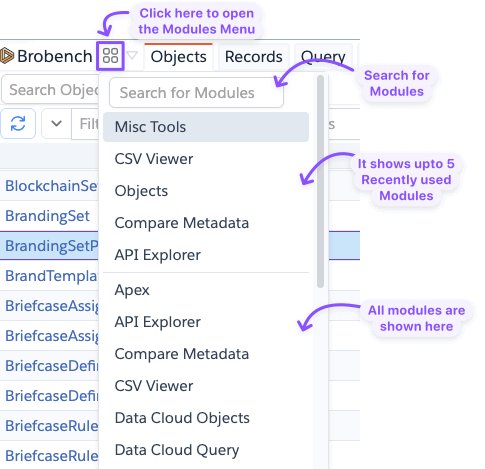
When you click on the Tools Icon, it opens the panel which has three parts viz., Search Control, Recently Used Tools,
and All Tools.
Click on the Search Input and type a search term to list tool containing that word. If you press enter, it will open the top most tool from the search list.
Once you open a Tool, that tool is added to the Most Recently Used list. Afterward it is shown in the second part of the panel, until other tools are opened, which pushes that tool off of the list.
You can also scroll to the tool you are looking for and click on it to Open.
Keep in Mind
- Brobench has a lot of tools, and the menu shows only the tools available in your edition. See Editions/Tools for more info
You can add any of the tools to your default tabs list via Custom Tab Layout in Preferences.