Preferences
Preferences tab allows you to customize various settings to adjust the app to your needs. Make sure you click on the
Save or Save & Reload button to persist your changes.
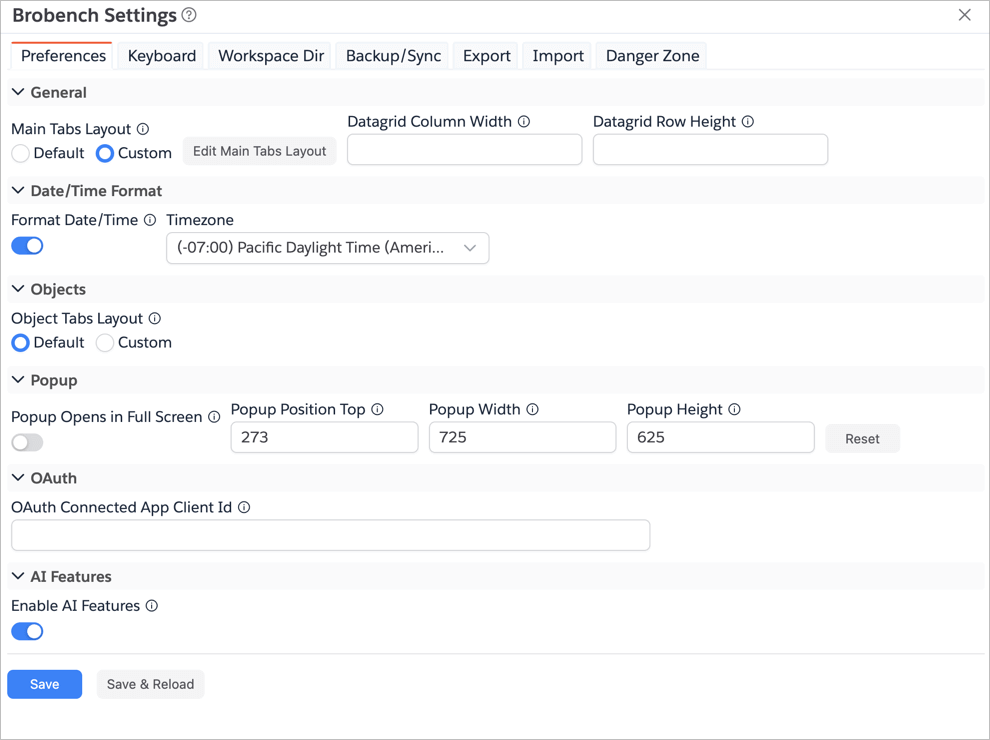
| Field | Description |
|---|---|
| General | |
| Main Tabs Layout | Customize which Main tabs are shown by default and in which order. |
| Datagrid Column Width | Default Column width for Datagrids |
| Datagrid Row Height | Default Row height for Datagrids |
| Date/Time Formatting | |
| Format Date/Time | If checked, date/time through the app will be formatted according to the specified Time Zone. |
| Default Copy/Export Format | Default Date/Time format to use for datagrid copy/export operations and in Export with Options dialog. Options are UI and System. |
| Timezone | Time Zone used to format all Date Time values in the app. Defaults to Connection time zone. |
| Objects | |
| Object Tabs Layout | Customize which Object Tabs are shown by default and in which order. |
| Popup | |
| Page Popup Mode | Controls how Brobench opens from Salesforce page launcher icon. Side opens at the right edge, Center opens as a larger centered dialog (80vw/80vh), and Full Page opens in full page/new tab mode. |
| Toolbar Popup Defaults to Logins Tab | If checked, app opens Logins tab by default when launched from the toolbar popup icon. If unchecked, app opens context-specific tab (Objects, Records, etc.) as appropriate. |
| Popup Position Top/Width/Height | Controls where and size of the Popup that is open when you click on the Brobench app launcher. |
| OAuth | |
| OAuth Connected App Client Id | If you want to Brobench to use your own OAuth Client Id to connect to Salesforce Orgs, specify the Client Id here. You can use this capability to allow Brobench to connect to your with API Control enabled. |
| AI Features | |
| Enable AI Features | If checked, AI features will be enabled in the App |